formative assessment, technology

Plickers

Our building focus this year is to incorporate exit slips into our daily routine.  There are so many really awesome programs and apps available that will grade and compile data for you.  Over the next few day, I plan to share some of the programs I have tried and found helpful (or fun)!

PlickersPlickers blew up on Twitter not long ago, so I had to see what the fuss was about.  This program definitely falls into the fun category.  I don’t use it every day, but it is a fun way to quickly assess vocabulary or a skill. I have tried this when students need to calculate and it doesn’t work as well.

Plickers uses the plickers.com website and an app for Apple or Android devices.  Students have a unique QR code and hold it up with the letter (ABC or D) facing up and the teacher scans the codes using a phone or tablet.  It instantly reads the answers and displays the results on the screen.  You can assign a card to a student and review the results later.  It doesn’t have the best reporting system and it doesn’t compile data for you.  It is fun and the students love seeing their name pop up on the screen when I scan their card.
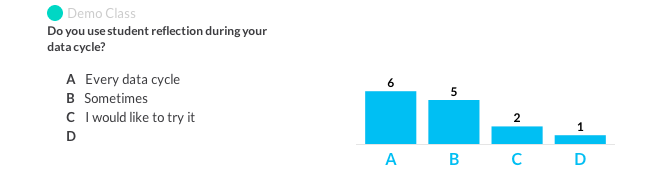
Plickers 2This is a screen shot from a one question assessment I used to introduce my PD session in January.

Give Plickers a try.  I have quite a few teachers in my school who have tried this and they are also hooked!

interactive notebooking, quadratics

Notebooking Switch

At semester, my Algebra 1 team decided to switch from interactive notebooks to note sheets.  We had received a lot of complaints from students and parents about spending time “gluing” in a high school classroom.  I loved notebooking, and it makes me sad to switch, but I want what best fits my students learning needs.  I’m still incorporating some parts of the interactive notebook and I will still try to use foldables and other interactive tools and just hole punch them and keep them in the binder.

One of my favorite parts of our notebook is the title page for the chapter.  We have our students track their own data for data teams, reflect over their mid-test formative assessment and create a goal for the unit.

Chapter 5 Title Page

I included some graphical elements into our note pages to make them more interesting. The note sheets below are for our quadratic unit.

Quadratic Note Sheets

So far our students like the “glue free” note sheets, and we haven’t had any complaints from parents about them.  Win-win!Name

Uncategorized

Face Q

This is a totally un-math related post.  My daughter downloaded the iPhone app FaceQ not long ago.  It was super fun creating avatars.  I can’t say “use this in your classroom” because it does have profanity as some of the extra options.  I’m still debating about using it for my students.  It’s very easy to use and if anything, something for your personal use when you don’t want to upload an actual picture.

2014-08-24 13.16.03 Here’s one of me and my teaching buddies.  I put it into a collage to display. It actually creates one image that can be shared or saved to the camera roll. 

2014-08-25 15.00.06This is my rendition of my 11 year old son.

Screen Shot 2014-09-03 at 9.25.07 AM


Happy creating!

Name

inequalities, interactive notebooking

Inequalities

I feel like I always start a post, “I found this idea…” and it’s usually from one of two websites (mentioned frequently by me.)  I, however, feel like this is what makes the teaching profession great. WE SHARE! Well, this lesson is no different.  I found this idea 🙂 at Math=Love and adapted her idea to fit my notebook.  I created two foldables, one for graphing inequalities, one for graphing compound inequalities.  I used XBOX and Call of Duty in my foldable because we talk about gaming a lot!  I love to play video games and students love to talk about the video games they play.

2014-09-03 07.44.18Please disregard the extra “crap” behind the foldable.  This is one page that was definitely a work in progress.  Those are original ideas behind the foldables, not all the ideas are gems either.

We had examples for the students work on the next page and I walked around and helped and gave smiley faces.  It’s amazing what a smiley face will do for a student.

Screen Shot 1.4 iPad Notes

I’ve included the pdf version of all the files.  

iPad Notes

Graphing & Solving Inequalities

Compound Inequalities

Name

interactive notebooking, Solving Equations

Literal Equations -sad face

This is one lesson that students absolutely HATE.  I feel like this year was better than most, and I’m hoping it was the interactive notebooking process that helped.  Having said that, students still struggled, and I mean a lot, with rearranging equations.  I created my own resources for this lesson (WHAT???) and was pretty excited about teaching it.  it wasn’t until I was walking around as students were working in groups until I realized that the lesson had the same result (for some groups) as in previous years.  When solving an equation for y, students were “magically” eliminating the x by incorrectly combining like terms.  We will just keep practicing…

The notebook looked good though 🙂 and I did have some success.  It wasn’t a total failure.

2014-09-03 07.24.40 2014-09-03 07.24.48


The “Why do we solve literal equations” part is something I always talk about but I think putting it in writing helps.  Since students think this process is awful, they should at least know why we do it.

Screen Shot 1.4 iPad notes

Here are the goods, if you want them.

iPad Notes PDF

Literal Equations Flip Chart Word

Remember – get your free fonts so the Word document looks good.  This one uses orange juice, one of my favorite (dafont.com is the bomb!)

Name

interactive notebooking, Solving Equations

Solving Equations Part Two

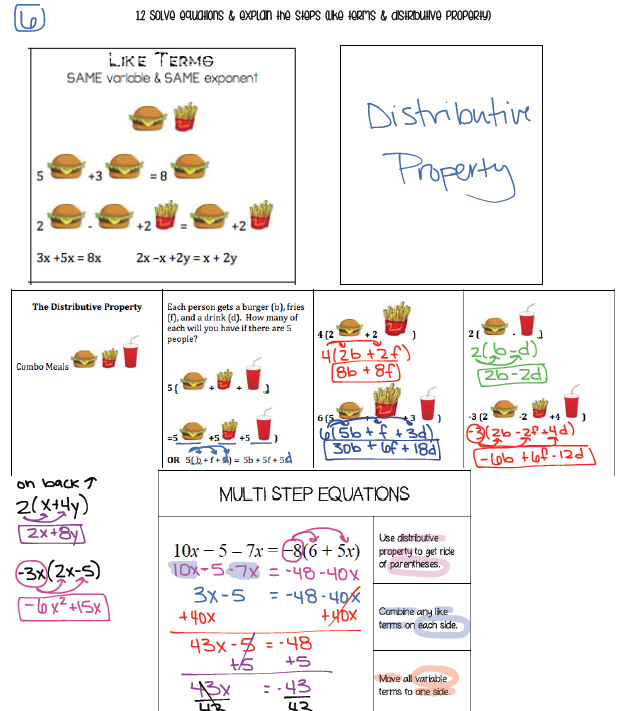
We split solving equations into two days.  Our curriculum has solving equations as review, but our new standard adds the explain element to problem solving.  I think it’s a good place to start the year.  I used the rest of the foldable from Everybody is a Genius, and added a few other ideas found around the web (I can’t find the source now).  I am also making files for my iPad so I can put the notes on my website for students who were absent or missed something during the process.  I like how this is working out also!


2014-09-03 07.23.50

Screen Shot 1.2 iPad Notes

The students are getting the process figured out and we aren’t taking as long getting items glued into the notebook.  We also used our data tracking sheet for the first time this week.  I’m excited to have the students enter their second assessment so they can see how much they have improved.

I have shared the link to my foldables (again, adapted from things I’ve seen on the web) and my pdf iPad files.  Two of them are Word files but you can download the fonts for free.  Just click in the font box to see what you need and head to the web for a search.

iPad Notes PDF

Distributive Property Foldable Word

Like Terms Word

Name


interactive notebooking

Interactive Notebooking – the beginning

With our first week of school complete, I now have a good idea about how INB is going to work in my classroom.  For the most part my students like it.  It is taking a little longer than I planned and with early dismissals for heat, I’m a little behind.  We spent the second day of class setting up the notebook and then began taking notes.  I am precutting all of the material right now, hoping to save some time.  Some students still don’t have their supplies, so I am providing glue sticks and notebooks.  I hope most of them eventually get supplies because it could get a little expensive for me if they don’t.

On page one, we used the information sheet the students filled out the first day and the second page is the student success page with important information from the class.  Page 3 has the Unit 1 Table of Contents and we have our data tracking page behind that.  I’m putting the tab (half of a mini post-it) for Unit 1 on this page because we will need to return to data tracking and table of contents frequently.

First Day Activity

Standards Graph

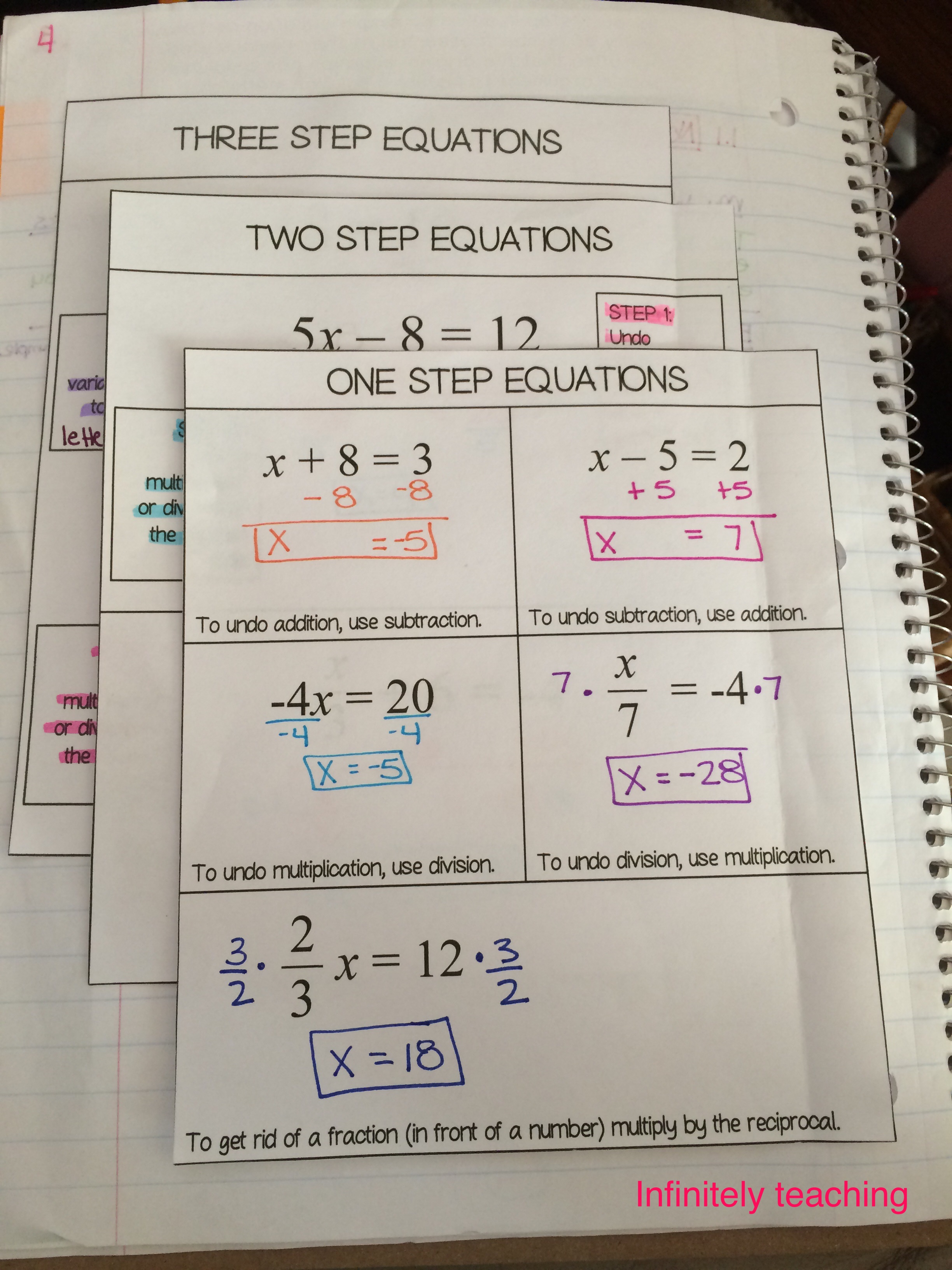
This is my first page of notes in the INB. We are putting the standard at the top of the page.  I used the Frayer Model for the vocab word equation.  The Inverse Operations page is from Math=Love (thanks for sharing!) 

2014-08-24 16.39.18

The next page is from Everybody is a Genius (also thanks for sharing!) and we glued the side down so they would fold out.  I also have a special case foldable that is on an example page.


2014-08-24 16.39.33


I still feel like I’m finding my way, but I like what we’ve done so far. I hope I can get the time factor figured out so I don’t get too far behind in my curriculum.  I haven’t been able to use the activities I’ve planned either (due to time) so I hope I can figure that out too.

Name

socratic circle

Student discourse in the math classroom

We all want our students to take ownership of their learning but as teachers it is sometimes difficult to give up the center stage and let the students take the lead.  Our math PD focus this year is student discourse.  I know I’m not on the low end of having students discuss with each other.  I find opportunities for students to teach each other and I encourage discussions among small groups most class periods.  This is a good start, but I know I need to do more.  I found a blog post from  The Number Twenty Four that talks about how she uses the socratic circle process in her math classroom.  I know a little about the socratic process, but until recently had not considered it a tool to be used in my math classroom.  I know this is where I would like to take my students, being comfortable discussing a math topic while giving considerations to the ideas and opinions of others.  In the post mentioned earlier, the author links to a WONDERFUL website she used to get started. Robert Kaplinsky has lessons that are searchable by Common Core standards and are designed to encourage conversations.   I’m not sure how quickly I will jump into this, but I think it will be a great experience for my students and will help them gain a deeper understanding of math concepts.  Since I’m at the beginning of this journey, I also welcome thoughts and advice from others who have successfully used the socratic process in their math classroom.

To new adventures…

Name

data teams

Easy Data Template

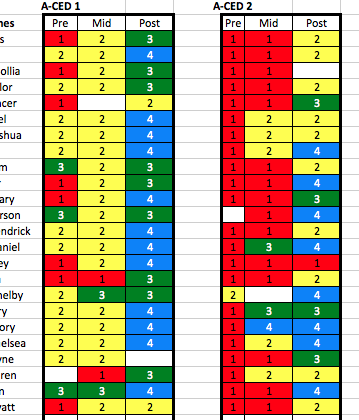
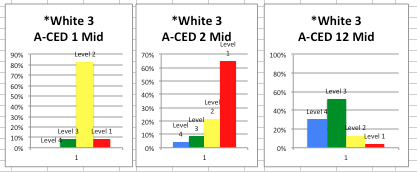
I’ve been using the data teams process in my classroom for a few years now. When I began I had no training, I had to do a lot of research and talk to a lot of people who used the process.  The forms seemed extremely long and didn’t give me the graphical representation I was looking for.  Over the past three years I’ve developed and tweaked a template that has made data collection more than just a “collection.”  This template shows growth for individuals, whole class, and combined classes.  I use a 4, 3, 2, 1 system for proficient to not likely to reach proficiency (terms from many data teams references.)

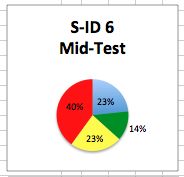
When you enter the number, it color codes for you, builds a graph for the class, totals all classes and builds a graph for the class totals.

data 1data bar

data circle

The last tab of the spreadsheet is for misconceptions, strengths and learning strategies.  This tab is the most important because data teams is a useless tool unless you use it to guide your instruction.

I’ve included a link to this tool for personal use.  I hope it makes the use of data in your classroom a little easier for you.

Name

interactive notebooking

New Year New Adventure

I’m excited to start this school year!  This summer I’ve been working on something that’s been sitting in my brain for a few years, interactive notebooking for Algebra 1.  With help from Math=Love and Everybody is a Genius I already have my first unit ready to go.  Both of these ladies have shared a lot of great ideas and files and hopefully I will have my own ideas and files to offer as the year goes on.  Biology at my school has been successfully using this process for quite some time, so I know the students will catch on quickly. I have used many parts of interactive notebooking in previous years; Foldables, color coding, and diagrams.  I think putting it together in this format will make it easier for students to stay organized, reference their notes more easily, and use their notebook as a resource.  I have included data charts and space for reflection for our priority standards, further connecting these standards to what the students are learning.  I know it will take some adjustments as the year goes on but I’m excited to begin this journey!